Integrating the Sunflower Monogram into Professional Creative Workflows
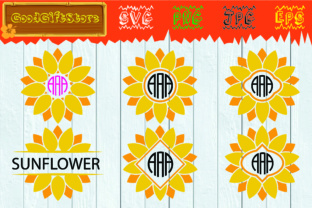
The Sunflower Monogram serves as more than just a decorative element; it is a functional design asset that bridges the gap between aesthetic appeal and practical application in digital crafting and branding. For professionals, educators, and small business owners, this specific floral motif offers a versatile solution for personalization projects that require both warmth and structural integrity. Understanding how to leverage this asset involves looking beyond the final image and examining the technical files, software compatibility, and workflow integration that make it a viable tool for production environments.
In the broader context of creative project management, the Sunflower Monogram acts as a foundational layer. Whether you are designing merchandise for an event, creating educational materials, or establishing a seasonal brand identity, this asset fits into the preparation phase of your workflow. It eliminates the need to draw complex botanical illustrations from scratch, allowing you to focus on layout, typography, and client-specific customization. By utilizing pre-made vector assets, you reduce production time while maintaining high standards of visual quality.
Technical Specifications and File Management
Successful implementation begins with understanding the deliverables. When you acquire this digital asset, you receive a zipped archive containing four distinct file formats. Each format serves a specific purpose within a professional workflow, and knowing when to use which file type is essential for efficiency and quality control.
- SVG Vector Files: These are the primary working files for cutting machines like Cricut and Silhouette Cameo. Because they are vector-based, they can be scaled infinitely without losing resolution. In software like Silhouette Studio or Cricut Design Space, the layers remain editable, allowing you to change colors, resize individual petals, or weld elements together seamlessly.
- PNG Files (300 DPI): High-resolution raster images with transparent backgrounds are critical for print-on-demand services, sublimation, and digital mockups. The 300 DPI specification ensures crisp edges when printing on physical media. The transparency allows for easy layering over colored backgrounds or textured surfaces without requiring manual background removal.
- EPS Files: Designed for professional vector editing in Adobe Illustrator or CorelDRAW, EPS files provide the highest level of editability. If you need to fundamentally alter the node structure of the sunflower monogram frame svg or integrate it into a complex branding suite, this is your master file.
- JPG Files: While less flexible than vectors, JPGs serve as quick reference thumbnails for client approvals, catalog listings, or low-resolution digital proofs where file size matters more than editability.
Organizing these files immediately upon download prevents downstream bottlenecks. A recommended practice is to create a standardized folder structure categorized by file type and project usage. This ensures that when you are mid-production, you are not wasting time searching for the correct transparent PNG or wondering if you have the source vector file available for adjustments.
Software Compatibility and Workflow Integration
The utility of a sunflower svg depends heavily on its interaction with your existing tech stack. For users of Silhouette Studio and Cricut Design Space, the SVG format is the industry standard because it preserves cut lines and layer separation. However, integration goes beyond simply opening the file. Professionals should test the asset’s node count and path complexity before committing to large-scale production runs. Clean vectors cut faster and result in less wear on blades and mats.
For graphic designers using Adobe Illustrator, the included EPS and SVG files allow for deep customization. You might combine the floral monogram svg with custom typography to create a unique logo lockup. Because the asset is vector-based, you can adjust stroke weights to match your brand guidelines or recolor the palette to fit specific seasonal campaigns without degrading image quality. This interoperability makes the asset a long-term resource rather than a single-use purchase.
Educators and content creators often utilize the PNG versions for digital products. When integrating the circle monogram svg style into worksheets, certificates, or presentation slides, the transparent background is non-negotiable. It allows the design to sit naturally over grid paper, colored slides, or photo backgrounds. In platforms like Canva or PowerPoint, uploading the high-resolution PNG ensures that the design remains sharp even when projected on large screens or printed at full page size.
Practical Applications Across Different Sectors
The versatility of the Sunflower Monogram allows it to function effectively across various professional and personal domains. Its application is rarely static; it adapts based on the user's intent and the medium of delivery.
Small Business and Merchandising
For entrepreneurs running Etsy shops or local boutiques, this asset streamlines product development. The sunflower monogram frame svg is particularly valuable for creating personalized items where the center space is reserved for customer initials or names. This modular approach allows for rapid prototyping of new products. You can create a base template in your cutting software, swap out the monogram letter for each order, and maintain consistent placement and sizing. This consistency builds brand recognition and reduces material waste caused by alignment errors.
Event Planning and Coordination
Wedding planners and event coordinators utilize flower monogram svg assets to create cohesive visual identities for celebrations. From welcome signs to table numbers and favor tags, having a unified floral theme ties disparate elements together. The ability to scale the SVG means the same design file can be used for a 24-inch acrylic sign and a 2-inch sticker without needing separate artwork. This simplifies vendor communication and ensures that all printed and cut materials match perfectly.
Education and Classroom Management
Teachers and homeschool educators use these assets to create engaging, personalized learning environments. Labeling cubbies, desks, and library bins with a student’s name inside a sunflower frame fosters a sense of ownership and belonging. The cheerful aesthetic of the sunflower is age-appropriate and welcoming. Furthermore, because the files are digital, teachers can reprint damaged labels instantly or update them as class rosters change, making it a sustainable and cost-effective classroom management tool.
Optimization and Quality Control Best Practices
To maximize the return on investment for this digital asset, users must implement quality control measures during the execution phase. Simply downloading the file does not guarantee a perfect result; preparation is key.
Test Cuts and Color Calibration: Before running a full batch of vinyl or HTV transfers, always perform a test cut. Botanical designs with intricate petals can sometimes have tiny nodes that may tear during weeding. Adjusting blade depth and pressure based on the specific complexity of the sunflower svg saves material. Similarly, if printing PNGs for sublimation, calibrate your printer profile to ensure the yellows and greens render accurately, as floral colors are sensitive to color gamut limitations.
Layer Management: When working with multi-layered SVGs in cutting software, organize your layers logically before welding or grouping. Rename layers to correspond with material colors (e.g., "Yellow Petals," "Brown Center," "Green Leaves"). This prevents confusion during the mat loading process and ensures efficient material usage. For complex floral monogram svg designs, consider using the "print then cut" feature for detailed inner elements while cutting the outer frame from vinyl, combining the strengths of both digital printing and physical cutting.
Licensing and Commercial Use: Always verify the license terms associated with your download. Understanding whether you can use the circle monogram svg for physical end-products versus digital redistribution protects your business legally. Professional workflows include a compliance check as a standard step before listing any new product derived from third-party assets.
Long-Term Asset Utilization Strategy
Treating the Sunflower Monogram as a reusable system component rather than a disposable graphic extends its value. Create master templates in your preferred software that already have the asset positioned, sized, and colored according to your most common specifications. For example, a t-shirt template, a mug wrap template, and a sticker template can be saved as base files. When a new project arises, you duplicate the master file rather than starting from zero.
This systematic approach also aids in marketing consistency. Using the same flower monogram svg variation across social media graphics, email newsletters, and packaging creates a recognizable visual thread. Over time, this repetition builds association in the minds of your audience. The sunflower becomes synonymous with your brand’s specific style of warmth and professionalism.
Finally, keep your asset library updated. As software updates occur, re-test your core SVG files to ensure compatibility. Technology evolves, and ensuring your go-to resources remain functional prevents emergency troubleshooting during peak production seasons. By maintaining organized files, understanding technical specifications, and applying strategic workflow integration, the Sunflower Monogram transforms from a simple download into a cornerstone of your creative infrastructure.