Integrating Antler Papers into Professional Creative Workflows
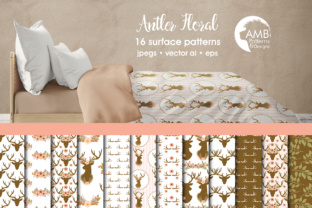
Establishing a cohesive visual identity for rustic, country chic, or romantic projects requires more than just selecting attractive images; it demands a reliable foundation of high-quality assets that streamline the design process. Antler Papers serves as this foundational element for creators, marketers, and hobbyists who need to produce consistent, professional-grade materials without spending hours generating textures from scratch. This collection of 16 distinct digital papers bridges the gap between organic aesthetics and modern digital efficiency, offering a versatile toolkit for everything from wedding stationery to commercial party printables.
In a professional creative workflow, asset selection is often the bottleneck that delays project initiation. By utilizing a pre-curated pack like Antler Papers (AMB-1490), designers can bypass the initial sourcing phase and move directly to layout and composition. These papers are not merely decorative backgrounds; they are functional design components engineered to support text, photography, and layered elements while maintaining high resolution for both digital viewing and physical printing. Understanding how to leverage these assets effectively can significantly reduce production time while elevating the perceived value of the final output.
Technical Specifications and Workflow Compatibility
Before integrating any digital asset into a production pipeline, verifying technical compatibility is essential to prevent downstream issues during printing or publishing. Antler Papers are formatted specifically to meet industry standards for scrapbooking and print design. Each of the 16 patterns is saved as an individual 12-inch by 12-inch JPEG file at 300 DPI. This specification is critical for professionals because it ensures crisp edge definition and color accuracy when files are sent to commercial printers or high-end home office equipment.
The 12x12 inch dimension acts as a universal standard in the memory keeping and invitation design sectors. For users working in platforms like Adobe Photoshop, Affinity Photo, Canva, or Procreate, these dimensions provide ample canvas space for standard square formats while remaining easily resizable for rectangular invitations or A4 documents. The JPEG format offers a balance between quality and file size, allowing for smooth performance even on laptops with limited RAM, unlike heavier TIFF or PSD files that can bog down multitasking workflows.
When organizing your digital asset library, treat this pack as a modular system. Because each paper is saved separately rather than in a single composite sheet, you can quickly drag and drop specific textures into active projects without loading unnecessary data. This separation supports non-destructive editing workflows where different variations of a project can be created rapidly by simply swapping the background layer. For entrepreneurs managing multiple client brands, this modularity allows for quick A/B testing of invitation designs or social media graphics using different floral and antler combinations.
Strategic Application Across Project Phases
The utility of Antler Papers extends across the entire lifecycle of a creative project, from initial concepting to final delivery. Integrating these assets at the right stage maximizes their impact and ensures design consistency.
Pre-Production and Mood Boarding
During the planning phase of weddings, corporate retreats, or product launches, visual communication is key to aligning stakeholder expectations. Use the floral and antler patterns to create tactile mood boards that convey texture and atmosphere more effectively than flat color swatches. When presenting concepts to clients or team members, placing sample typography and photography over these textured backgrounds helps visualize the final emotional tone. This reduces revision cycles later in the process because the aesthetic direction is validated early using actual project assets rather than generic placeholders.
Active Design and Layout Execution
During the execution phase, Antler Papers function as both background and foreground elements. For scrapbooking and memory keeping, the 300 DPI resolution allows for detailed close-ups where the grain of the paper and the intricacy of the floral clipart remain sharp. In invitation design, these papers provide sufficient contrast for typography. A practical implementation tip is to use the darker antler patterns for white text overlays and the lighter floral patterns for dark serif fonts, ensuring accessibility and readability compliance.
For 3D cardmaking and paper crafting, these digital files serve as precise cutting templates. Users can import the JPEGs into cutting machine software (such as Cricut Design Space or Silhouette Studio) to create custom score lines or print-then-cut projects. The original high-quality clipart embedded within the paper designs can also be extracted or masked to create coordinating embellishments, stickers, or envelope liners, ensuring that every physical component of a suite matches perfectly without requiring additional purchases.
Post-Production and Product Delivery
After the primary design is complete, Antler Papers continue to add value in marketing and packaging. Small business owners selling physical goods can use these patterns as digital thank-you card backgrounds or packaging inserts. Photographers can utilize them as backdrops for flat-lay product photography or as digital borders for client galleries. Because the designs are original and high-resolution, they maintain integrity when repurposed across different media, extending the ROI of the initial asset acquisition.
Optimizing File Management and Asset Organization
Efficiency in creative work is often dictated by how well resources are organized. With 16 unique patterns, implementing a logical naming convention and tagging system is necessary for long-term usability. Rather than relying on generic filenames, rename files to reflect their dominant characteristics, such as "Antler_Papers_DarkWood_Floral_01.jpg" or "CountryChic_LightRose_Texture_04.jpg." This semantic naming allows for instant retrieval via operating system search functions during tight deadlines.
Consider creating smart folders or collections within your design software that group these papers by color palette or intended use case. For example, a "Wedding Suite" collection might contain the softer florals and lighter antlers, while a "Rustic Party" collection groups the bolder patterns. This front-loaded organization eliminates decision fatigue during active design sessions. Additionally, always maintain a master backup of the original AMB-1490 files in cloud storage. Working copies should be duplicated into project-specific folders to prevent accidental overwriting or corruption of the source assets.
Quality Control and Print Considerations
While Antler Papers are optimized at 300 DPI, real-world output depends heavily on printer calibration and paper stock selection. Before committing to large print runs for invitations or party decor, conduct test prints on the exact substrate intended for the final product. Textured digital papers can interact unpredictably with textured physical papers; a linen cardstock might enhance the rustic feel, while a glossy photo paper could make the antler texture appear artificial.
Color management is another critical factor. Digital screens display RGB color, while printers use CMYK. Although the JPEGs are high quality, slight color shifts may occur during conversion. Incorporate a soft-proofing step in your workflow to anticipate how the warm browns and delicate florals will translate to ink. If you are outsourcing printing, request a physical proof to verify that the subtle details in the original clipart are not lost in the compression or printing process. This diligence ensures that the "Country Chic and romance" promised by the digital preview translates faithfully to the tangible product.
Expanding Creative Possibilities Through Layering
To maximize the versatility of this pack, move beyond using the papers as static backgrounds. Professional designers often blend multiple patterns to create custom textures that are unique to a specific brand or event. Using blending modes like Multiply, Overlay, or Soft Light in your image editing software allows you to combine a floral pattern with an antler texture, adjusting opacity to create depth that neither pattern possesses alone.
This layering technique is particularly useful for creating custom branding kits. By establishing a proprietary blend of Antler Papers, you ensure that a client’s invitations, menus, place cards, and website headers share a unified but nuanced visual language. Furthermore, these blended textures can be exported as new assets for future use, effectively expanding your library without additional cost. For educators and content creators, these layered backgrounds provide engaging visuals for worksheets, presentation slides, or video thumbnails that capture attention without distracting from the core message.
Evaluating Long-Term Value and Versatility
When assessing digital assets for professional or personal use, consider the longevity of the style. Antler Papers occupy a niche that balances trendiness with timelessness. While specific design fads come and go, the combination of natural wood textures and botanical elements remains a staple in celebration and memory-keeping industries. This enduring appeal makes the pack a sustainable investment for freelancers and businesses that serve clients with traditional or nature-inspired tastes.
The inclusion of original high-quality clipart within the paper designs further enhances long-term value. Unlike generic stock textures, these integrated elements offer exclusive design opportunities that cannot be replicated by competitors using free resources. Whether you are designing a birthday party suite today or a heritage album next year, the adaptability of these 16 patterns ensures they remain relevant tools in your creative arsenal. By treating Antler Papers as a flexible system rather than a disposable decoration, you build a more efficient, consistent, and professional creative practice.