Elevating Creative Projects with High-Quality Label Clipart
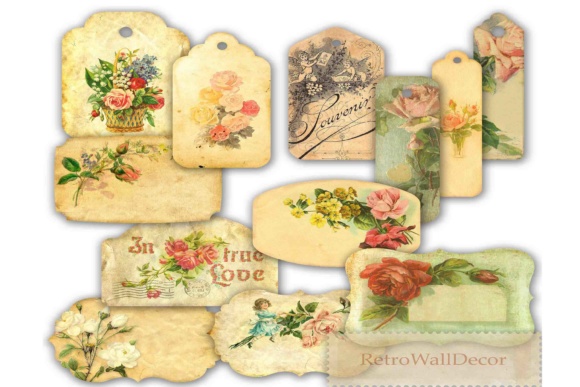
In the world of digital design and paper crafting, the difference between a generic project and a masterpiece often lies in the details. Label clipart serves as one of the most versatile tools in a designer’s arsenal, bridging the gap between functional organization and artistic expression. Whether you are an experienced graphic designer or a hobbyist scrapbooker, understanding how to effectively utilize high-resolution label assets can transform your work. Specifically, collections featuring Spring Labels, Romantic Labels, and Vintage Roses offer a unique aesthetic that combines nostalgia with modern usability. When sourced correctly—typically as 300 DPI PNG files between 6 and 7 inches—these digital elements provide the clarity and flexibility needed for professional-grade backgrounds, card designs, and intricate graphic projects.
Understanding the Role of Label Clipart in Modern Design
At its core, label clipart is more than just a decorative tag; it is a structural element that guides the viewer's eye and establishes hierarchy within a composition. For adults engaged in creative pursuits, the primary challenge is often finding assets that do not look pixelated when printed or overly simplistic when viewed on screen. Many free resources lack the necessary resolution for physical media, leading to frustration when a beautiful screen design translates poorly to paper.
High-quality label clipart solves this by offering substantial dimensions and density. A 6-to-7-inch PNG file at 300 DPI ensures that the artwork remains crisp even when used as a central focal point on a standard letter-sized page or a large greeting card. This technical specification is crucial for users who need to scale elements down for business cards or maintain size for poster art without losing the intricate details of floral print art or textured vintage overlays. Furthermore, the transparent background inherent in PNG formats allows these labels to layer seamlessly over patterned papers, photographs, or solid colors, making them indispensable for complex scrapbooking layouts where depth and dimension are key goals.
Solving Design Challenges with Thematic Versatility
Creative blocks often stem from a mismatch between the available assets and the intended mood of a project. A common situation arises when a crafter wants to create an Easter label that feels elegant rather than cartoonish, or a Romantic label for wedding stationery that avoids looking dated. Curated collections of label clipart address this by providing thematic consistency. Instead of piecing together disparate elements that clash stylistically, users can access cohesive sets that include matching vintage labels and botanical illustrations.
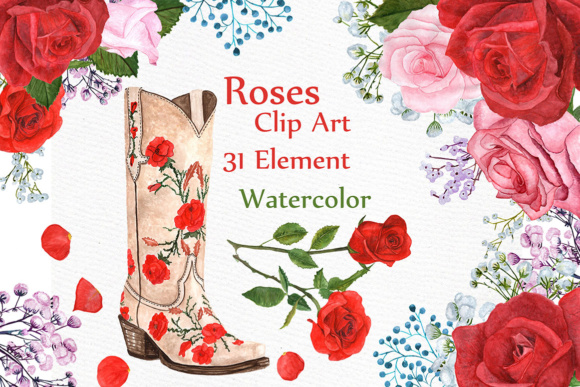
For example, incorporating vintage roses into a label design instantly evokes a sense of timeless romance and heritage. This is particularly useful for genealogy projects, anniversary invitations, or luxury product packaging where the emotional resonance of the visual is as important as the text it holds. By utilizing pre-designed digital labels with these specific motifs, creators save hours of illustration time while ensuring the final output possesses a polished, professional aesthetic. The goal here is efficiency without sacrificing artistry; the clipart provides the heavy lifting regarding texture and style, allowing the user to focus on typography and personalization.
Practical Applications Across Different Mediums
The utility of high-resolution label clipart extends across numerous practical applications. Understanding how different users approach these assets can help maximize their potential in your own workflow.
- Scrapbooking and Memory Keeping: For memory keepers, journaling spots are essential. A floral print art label provides a designated space for handwriting or typed notes while enhancing the page theme. Because these PNGs are high resolution, they can be printed directly onto photo paper or cardstock and physically adhered to albums, maintaining the tactile quality of traditional scrapbooking with the precision of digital design.
- Card Making and Stationery: Card makers frequently struggle with centering and alignment. Using a symmetrical vintage label as a base layer creates a natural frame for sentiments. Whether designing for Easter, Mother’s Day, or a romantic occasion, the label acts as an anchor. Users can employ blending modes in software like Photoshop or Procreate to let the paper texture show through the digital ink, creating a hybrid look that feels authentic.
- Digital Planning and Social Media: Not all applications are physical. Digital planners and social media templates benefit immensely from transparent PNG labels. A spring label can serve as a header for a blog post or a highlight cover on Instagram. In this context, the 300 DPI resolution ensures the image looks sharp on high-density mobile displays, while the 6-7 inch size allows for cropping and resizing without degradation.
- Product Packaging and Branding: Small business owners often use label clipart for jar labels, gift tags, or thank-you cards. Vintage styles convey craftsmanship and quality. By using a high-quality digital label as the foundation, brands can achieve a boutique look without the expense of custom letterpress printing for every short run.
Technical Considerations for Optimal Results
To truly benefit from label clipart, users must pay attention to technical implementation. While the asset itself may be high quality, improper handling can diminish its impact. One critical consideration is color management. Vintage roses and floral prints often contain subtle gradients and muted tones that define their character. When preparing files for print, ensure your workspace is set to CMYK if sending to a professional printer, or use high-quality RGB settings for home inkjet printers to preserve color vibrancy.
Additionally, consider the interaction between the label and the background. A busy floral print art background may compete with a detailed vintage label. In such cases, users should utilize the label as a masking element or apply a subtle drop shadow to lift it off the page. Conversely, if the label features dense ornamentation, pair it with a simple, solid-colored background to allow the clipart to shine. For those new to digital design, starting with a 6-inch label on an 8.5x11 canvas provides ample white space for experimentation before committing to a final layout.
Selecting the Right Assets for Your Needs
Not all label clipart is created equal, and discerning users should evaluate resources based on specific criteria beyond just aesthetics. When seeking digital label packs, verify the file specifications before downloading. True 300 DPI files will have significant pixel dimensions; a 6-inch label at this resolution should be approximately 1800 pixels wide. Files significantly smaller than this may appear soft or blurry when printed at full size.
Furthermore, examine the transparency of the PNG. High-quality clipart should have clean edges without jagged pixels or unwanted white halos. This cleanliness is vital for layering over dark backgrounds or colored cardstock. For users focused on Easter labels or seasonal themes, look for collections that offer variations—such as empty frames, lined writing spaces, and solid banners—to ensure the pack offers enough variety for multiple projects. Ultimately, the best label clipart is that which disappears into the design, feeling less like a sticker placed on top and more like an integral, organic part of the composition. By prioritizing resolution, thematic coherence, and technical integrity, creators can leverage these digital tools to produce work that is both visually stunning and deeply personal.